
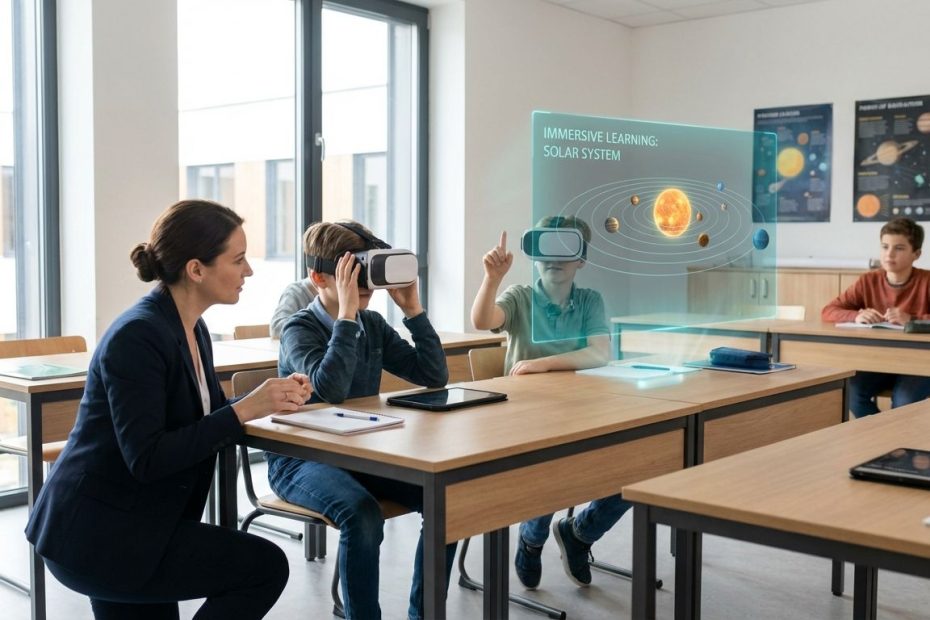
VR and AR are changing learning by turning abstract concepts into hands-on experiences you can run on demand, from virtual science labs and job-skill simulations to AR overlays that guide students step-by-step in the real classroom. When implemented with clear instructional goals, solid device management, and tight content controls, immersive learning improves practice time, comprehension in spatial subjects, and student engagement.
This guide shows how to deploy VR and AR in real classrooms without losing instructional time. It walks through where immersive lessons work best, what devices and management systems schools actually use, how to handle safety and age rules, how to budget beyond hardware, and how to measure learning impact so programs scale instead of stalling after a pilot.
What Are The Biggest Benefits Of VR And AR In The Classroom, And Where Do They Work Best?
VR and AR deliver their best results when you use them to replace passive instruction with active practice. VR gives you controlled immersion, so students can rehearse a lab procedure, explore a place that is not accessible, or repeat a technical workflow until it sticks. AR keeps students anchored in the physical classroom while adding guidance, labels, and 3D objects that clarify what they are seeing.
In day-to-day school operations, the highest-value wins concentrate in a few predictable patterns. VR excels for simulated labs, safety training, and field experiences that would be too costly, too risky, or impossible to run at scale. AR performs well for quick, “heads-up” support: visualizing geometry, labeling anatomy models, translating a diagram into a manipulable 3D object, or adding step cues during hands-on tasks.
You get the strongest fit in skill-heavy and spatial learning domains. Career and technical education, healthcare training, engineering concepts, and complex systems in science benefit because students can practice processes, not just recall facts. History and geography can also benefit when the experience is tied to a specific learning objective and an assessment, rather than being used as a one-off reward day.
There is also a practical reason these use cases work: they match the classroom clock. You can run a 10–15 minute AR activity or a 20-minute VR simulation inside a standard period, then shift into discussion and assessment. That workflow helps you avoid the most common failure mode in immersive learning: spending more time putting on devices than teaching.
What VR And AR Devices Are Schools Actually Buying In 2025–2026, And What Costs Show Up After Purchase?
Most K–12 deployments still lean toward standalone VR headsets because PC-tethered setups multiply cost and support burden. Standalone units reduce friction for teachers, and they scale more predictably across a cart-based model. Premium mixed-reality headsets show up more often in higher education, specialized labs, and enterprise-style training programs where budgets and IT staffing can handle higher support expectations.
Operational cost is rarely dominated by the headset price. The recurring spend tends to come from device management, content licensing, replacement facial interfaces, charging and storage, cleaning supplies, and staff time for setup and resets. Programs that budget only for headsets end up limiting usage because the “last mile” operations are underfunded.
Device management remains a make-or-break requirement when you move from a demo to a district-ready program. Meta publicly described its plan to launch an education product for Quest devices designed to help teachers manage multiple headsets at once and access education-focused apps, based on consultation with educators. That announcement was dated April 15, 2024, and it also noted launch availability targeting institutions serving learners aged 13+ in Quest for Business supported markets. This matters operationally because streamlined multi-device management is what reduces the time drain between classes and makes routine use possible.
On the management side, one concrete, date-specific change matters for budgeting. Meta Horizon Managed Services (HMS), which is used to enroll and manage Quest headsets at scale in business and enterprise contexts, became free effective February 20, 2026, and entered maintenance mode through January 4, 2030, with support continuing through 2030. For school systems and training programs relying on that stack, the removal of the monthly fee can reduce recurring cost, yet the “maintenance mode” detail signals that long-term planning should avoid dependence on new features arriving later.
A disciplined way to think about total cost is per-student learning minute delivered, not per device purchased. If a headset sits idle because the app updates are manual, accounts are messy, or the content does not map to weekly standards, the program becomes expensive fast. If you can reliably run two short immersive activities per week per headset with minimal teacher setup, cost efficiency improves quickly.
Is VR Actually Being Used By Students Today, Or Is It Still A Niche Tool?
VR is no longer rare, yet it is still not routine for most students. Ownership has increased, and exposure through school pilots is more common, yet daily use remains low. This gap matters because it affects how much training time you need for basic comfort, controller use, and classroom behavior expectations.
Two widely cited signals help you calibrate expectations. A Florida Atlantic University write-up dated October 22, 2024 described findings from a nationally representative sample of 5,005 U.S. youth ages 13–17, reporting 32.6% ownership of a VR headset and about 13% weekly use. That shows many students have at least some exposure to VR hardware. A separate teen survey reported by CNBC on April 4, 2023 found that daily VR use among teen headset owners was 4%, reinforcing that frequent use is still limited even when ownership exists.
In classroom terms, this means a “VR day” can still feel novel to many students, and novelty can work against you if the lesson design is not tight. Students burn time exploring the environment or experimenting with controls, and the learning objective gets diluted. The fix is straightforward: treat immersion like lab equipment, not entertainment. Provide a short onboarding routine, a clear task list, and a timed experience window tied to a check-for-understanding.
Adoption also varies by grade band and subject. Older students in workforce pathways tend to accept repeated VR practice because it feels job-relevant and performance-based. Younger students can succeed with AR and short VR experiences when the classroom management plan is explicit and the content is tightly controlled.
What Breaks First In Classroom VR, And How Can Classroom Leaders Prevent It?
What fails first is usually not the headset. The first break is operational: identity, access, and time. If students cannot log in fast, if content access differs by account type, or if devices are not reset cleanly between periods, teachers stop scheduling immersive lessons because it disrupts pacing.
Account and eligibility rules also create friction when you use consumer-grade ecosystems inside a school environment. Community discussions frequently surface practical issues around account setup, redemption flows, and child-account restrictions. Even when policies are clear, classroom reality is that shared devices and mixed-age student groups create edge cases you must plan for with your IT team.
Classroom flow is the next failure point. Headsets must be charged, stored, sanitized, and distributed in a consistent routine. If a teacher needs ten minutes to hand out devices and solve fit issues, the learning return drops. Programs that scale create a “set, distribute, launch, collect, reset” routine that students can execute with minimal teacher intervention.
Content fit is the long-term pressure. A catalog of impressive demos does not equal a curriculum. Schools that succeed standardize a small set of repeatable lesson types that map to standards and assessments, then expand slowly. In practice, three lesson families cover most wins: lab simulation, field experience, and skill rehearsal.
Is VR And AR Safe For Students, And What Do Age Rules From Major Platforms Actually Say?
Safety in immersive learning is mainly about your environment choices and controls, not just the device. Open social VR introduces risks you do not need in a classroom, and it complicates supervision. Most school implementations reduce risk by using curated learning apps, disabling public social features, and running sessions in a managed mode with controlled content.
Age guidance differs by platform, and you need to align it with your student population and your policies. Apple’s official safety information for Apple Vision Pro states the device is designed to fit and be used by individuals 13 years of age and older, and that users age 13+ should be supervised by an adult. Meta’s education product announcement in April 2024 also described plans to make the education offering available to institutions serving learners aged 13+ at launch, which signals where Meta expected education deployments to concentrate at that time.
Risk evidence also matters for policy design. The Florida Atlantic University write-up dated October 22, 2024 reported a meaningful share of youth experiencing harmful behaviors in metaverse and VR contexts, including harassment and exposure to unwanted content. School leaders can treat this as a design requirement: prioritize “walled garden” learning apps, keep sessions supervised, and avoid open social worlds unless there is a specific instructional reason and strong moderation controls.
If a district wants to serve younger students, AR on tablets and phones often provides a safer and simpler entry point. You still get 3D visualization and interactive overlays, and classroom supervision remains familiar. VR can still be used with younger learners in limited contexts when the platform rules allow it and the experience is tightly controlled, yet that should be a deliberate decision supported by policy and training.
How Should VR And AR Lessons Be Designed So They Improve Test Scores, Skills, And Classroom Time-On-Task?
Lesson design determines whether immersive learning earns a recurring slot in the weekly plan. A strong VR or AR lesson starts with a measurable objective: a skill students must perform, a concept they must explain, or a procedure they must execute correctly. Without that anchor, the lesson becomes an experience with weak academic carryover.
Keep immersion windows short and purposeful. A 10–20 minute VR simulation with a clear task list often beats a 45-minute open exploration. Students maintain focus, motion comfort improves, and you preserve time for discussion and assessment. AR activities can be even shorter, acting as a “visual assist” inside a standard lesson rather than replacing it.
Build a predictable loop: pre-brief, immersion task, debrief, assessment. The pre-brief sets vocabulary and expectations, the immersion task produces observable actions, the debrief consolidates learning, and the assessment makes progress visible. This structure also helps you defend the program during budget review because you can point to measurable outcomes, not just engagement.
Prioritize repetition and feedback. VR is uniquely valuable when students can repeat a procedure safely and receive immediate cues. That is why healthcare and CTE programs often see faster value: the simulation is a controlled practice arena. You can apply the same principle in science labs, engineering, and safety training by designing tasks that require correct sequencing and accuracy, not passive viewing.
How Can Schools Roll Out VR And AR Without Losing Control Of IT, Budget, And Teacher Workload?
A rollout that scales starts with constraints, not devices. Define what classes will use immersive learning, how often, and what outcomes must improve. Then pick hardware and software that meet those requirements. This prevents the common pattern of buying headsets first and searching for curriculum alignment later.
Run a pilot that behaves like the future program. Use the same charging carts, the same identity model, the same content approval process, and the same classroom routines you would use at full scale. A pilot that relies on heroic effort by one tech-savvy teacher produces misleading results because it cannot be replicated across a district.
Device management must be addressed before expansion. Meta’s April 2024 education product announcement emphasized multi-device management and education-specific access as key educator requests, which matches what districts consistently need: app deployment, controlled settings, shared device workflows, and fast resets. On the enterprise management side, HMS becoming free on February 20, 2026 can reduce cost barriers for organizations using that enrollment path, yet you still need a plan for maintenance mode through January 4, 2030 and what platform support looks like beyond that window.
Teacher workload drops when you standardize. Build a small catalog of approved lessons per grade band, provide a one-page run guide per lesson, and train student helpers for distribution and collection. That operational discipline increases usage, which is the only reliable way to turn an immersive investment into academic output.
What Does The VR And AR Market Direction Signal For Classroom Planning Over The Next Few Years?
Classroom planning improves when it reflects platform realities. One practical signal is that vendors adjust strategies quickly, and education buyers need to avoid locking into assumptions about ecosystem expansion. Meta’s public moves in 2024–2026 show how quickly focus can shift: the company announced efforts around education products for Quest devices in April 2024, and it also promoted an ecosystem approach around Horizon OS partnerships in 2024.
More recently, reporting indicated Meta paused its third-party Horizon OS headset program, which had involved partners like Lenovo and Asus. For education leaders, the direct lesson is not to chase every ecosystem bet. Build procurement and curriculum plans that can survive platform changes, with portable content strategies and clear exit paths.
Another operational signal is the enterprise tooling shift around HMS. Making HMS free effective February 20, 2026 removes a recurring cost line item, yet placing it into maintenance mode through January 4, 2030 clarifies that the management layer is expected to remain stable rather than feature-rich. Stable can be good for schools, as long as the program plan does not depend on future roadmap promises.
The best hedge is to invest in instructional design capacity and evaluation methods. Hardware refreshes will happen, platforms will pivot, and content libraries will change. A district that can define objectives, run controlled pilots, measure outcomes, and scale what works will outperform a district that chases devices.
How Do VR And AR Improve Learning In The Classroom?
- VR enables safe skill practice and immersive simulations.
- AR overlays 3D guidance onto real lessons.
- Best results come from short tasks, tight controls, and measurable assessments.
Put Immersive Learning On The Weekly Schedule
VR and AR earn their place in the classroom when they deliver repeatable practice, clearer understanding, and smoother instruction, not just memorable moments. Focus on the use cases that consistently pay off, including simulations, field experiences, and procedural rehearsal, and keep AR as a fast visual support layer inside normal lessons. Lock down operations early: device management, charging and sanitation routines, identity rules, and a small approved content set that maps to standards. Treat safety and age guidance as build requirements, leaning toward curated learning apps and supervised use. After reading this, implement a pilot plan with measurable outcomes, calculate total cost beyond hardware, then scale only the lessons that improve performance and time-on-task.
References
- Meta Newsroom (Apr 15, 2024): New Education Product for Quest Devices
- Resolve Help Center (Updated 2026): Changes to Meta Horizon Managed Services (HMS)
- ManageXR Help Center (Updated Jan 23, 2026): HMS Free Starting Feb 20, 2026
- Florida Atlantic University (Oct 22, 2024): Dangers of the Metaverse and VR for U.S. Youth
- CNBC (Apr 4, 2023): Only 4% of Teen Headset Owners Use VR Daily
- Apple Support: Important Safety Information for Apple Vision Pro (13+ Guidance)
- The Verge (Reported 2026): Meta Pauses Third-Party Horizon OS Headset Program

Chrysilios Chrysiliou is a commercial real estate executive at RDPH Properties, Inc. with a diverse background in aviation and entrepreneurship. A former Greek Air Force Academy graduate, flight instructor, and flight school co-owner, he now leverages decades of strategic leadership to identify and develop high-value real estate opportunities.